The Elgato Streamdeck for Shell Aliases on Headless Linux
Let’s set the stage:
I have many computers in my office. I live in residence in the US with the typical 15A/110V power supply, meaning 1650 Watts maximum power available on a single circuit - and my office is a single circuit.
| Device | Nominal Max Power |
|---|---|
| Work Laptop | 140W |
| Personal Computer | 750W |
| Server | 800W |
| Gaming PC | 450W |
| Network Hardware | 48W |
| Medium Monitors | 4x ~ 30W = 120W |
| Large Monitors | 110W + 120W = 230W |
| Lights | 11x ~6W = 66W |
| Total |
2614 W |
so, you can see a problem here.
Fortunately, most of the computers aren’t running full tilt at any given time.
If we assume ~100W at idle for the PCs and basically zero at idle for the laptop (it sleeps, PCs don’t), we might have 1114 Watts at any given time. Okay, totally safe!
Now, there are a couple highly-variable draws in here, which are rarely going, basically zero except when in use:
| Device | Nominal Max Power |
|---|---|
| USB Charging Warts | 11x ~ 80W = 880W* |
| Laser Printer | 960W |
| Total |
1840 W |
so, you can see a problem here.
Fortunately, it would be basically impossible for all USB charging warts to be running at full-tilt at once. Maybe only ever 80W at a time. That printer, though…
If we take the “safe” 1114 W and add that 960 peak (when it’s warming up), we get 2074 Watts. That’s… significantly above the room’s circuit. But, it only draws that amount for a short period of time (the lights do flicker…) before dropping down to its “printing” consumption of 480W, putting the room at 1594 Watts. That’s pushing it, but totally viable!
Just don’t run multiple computers at full tilt at once, and then try to print.
Running Multiple Computers At Full Tilt at Once#
Before I got the printer, I used to have all 3 personal computers mining Monero when idle - xmrig in the background at the lowest CPU priority. And, only using CPU mining, since GPU mining was not power-efficient per Watt.
That kept each PC’s CPU at its max power consumption, around 65W + 65W + 105W = 235 Watts, so our baseline would’ve been ~ 1348 Watts.
But a year or so ago, the mining pool I’d been using went offline, and I never got around to setting up p2pool for peer-to-peer mining, so the xmrig processes sat idle, with no work.
Setting Up P2Pool#
I set up P2Pool on the server recently, and got two of the PCs mining again. The third… is offline, and its saga will go in a separate post in the future when it’s back.
So we’ve got 2 PCs mining at full power consumption, so the room baseline is probably around 1285 Watts.
And Then I Printed#
+960W to bring the room to 2245 Watts, 595 over the circuit’s nominal maximum.
The breaker tripped. I flipped it back and tried again, just to be sure. Same thing.
Okay, cool, my nominal 1650W office can handle spikes of ~400W but not ~600W.
Obviously, I need to stop the mining before I print.
Stopping the Mining#
With each miner pulling work from the p2pool on the server, stopping the p2pool is a convenient shortcut to stop all the miners - they’ll have no work, and power consumption will drop.
So, do I just remember to log in to the server and run sudo systemctl stop p2pool before I print?
No!
On Air#
I work in the office, and am often in meetings. I wrote a 3-part software system to allow my work laptop to indicate when I was in a call, and push that to an “on air” sign hung outside my office. But it supports multiple signs, so I have another “monitor” on-air sign inside the office.
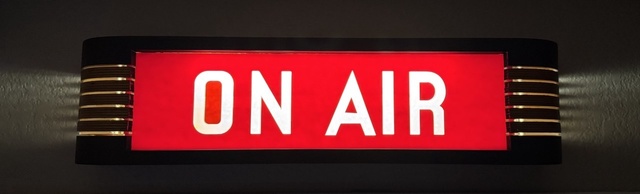
But sometimes I use my cell phone. I have not built software for the cell phone to detect when I’m on a call in my office specifically, and activate the on-air signs. So, when I’m using the phone, I usually just log into the server and run a little alias I’ve put together to toggle the on-air status manually.
Hardware Aliases#
Violating the rule of three, I decided these two use-cases justified buying an Elgato Streamdeck.
The plan was to make a button for toggling p2pool and for toggling the on-air signs, and run the streamdeck cable from my server over to my main PC, so I can just push the “Mining Off” button before I try to print. Crucially, the LED screens on the streamdeck meant I would have an indicator of the state of the mining, so I would know when the shutdown had actually completed (and thus power consumption was low enough for printing to be safe).
On a headless linux server, though? Yes, with the streamdeck python library!
Niko banged out the on-air integration in a couple minutes: a little python server just registered as a third sign and toggled the button’s display when on-air vs off-air. Pushing the button queried the on-air server’s current state and then pushed the opposite to the API.
Toggling Systemd Units With a Button (But Not Root)#
For the p2pool toggle, we needed to listen to state changes in the p2pool systemd unit to keep the button’s display accurate, and we needed the process listening to Streamdeck button presses to be able to systemctl ... the p2pool service. But, I wasn’t going to run that server as root. So, fun permission!
Niko nailed this, too, but it took a bit of telephone since the AIs don’t have root access to the server (yet…).
The magic ended up being polkit config to grant systemd access to the user that was running the server process that was managing the streamdeck. Unfortunately, my system’s polkit is an older version that doesn’t support programmatic configuration (only config-based), so while a newer system would be able to limit that user to just being able to bounce the p2pool service… I ended up having to give that user full access to manipulate my systemd units. Bummer for now.
Victory#
But, it works!
I have two reactive, physical buttons that I can push to toggle these services:
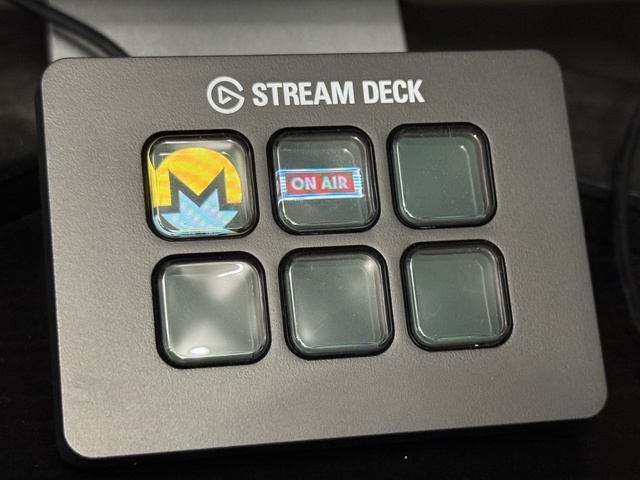
The Monero button will indicate while the service is shutting down and then stabilize to a different icon when it’s totally off (and safe to print):
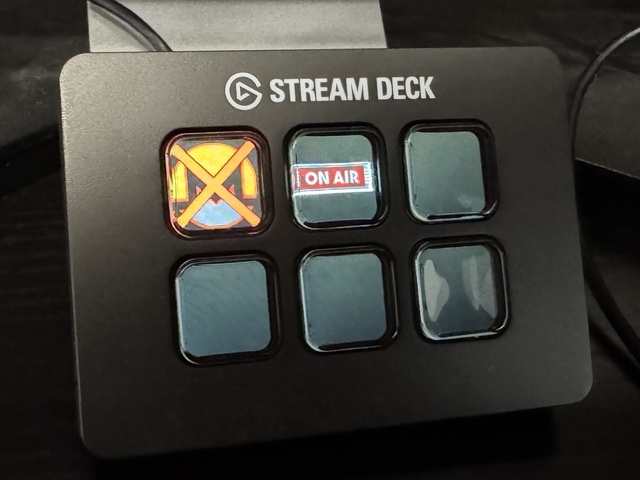
The “on air” button’s sign icon lights up just like the real signs do when I’m on-air.
And, I still have four buttons remaining!