We [put WireGuard on a host](/2026/08/22/the-gate-lodge.html) so we could restart the VPN without restarting the house. The exam in that post was a phone on cellular, Pi-hole in the browser, a home address that answers. Cellular never numbers itself `192.168.1.0/24`. A lot of cafes do.
The laptop joined one and received `192.168.1.253`, which is also the VPN box. The official [WireGuard](https://www.wireguard.com/) app said Connected. `ping 192.168.1.254` hit the cafe.
## The Cafe Already Had the /24
The first post's public surface is one UDP port, forwarded to `192.168.1.253`. Inside the tunnel, clients live on `192.168.101.0/24`. The edge router still owns Wi-Fi, DHCP, and NAT for `192.168.1.0/24`, plus a LAN static route that sends the overlay back to the VPN box. [Masquerade stays off](/2026/08/22/the-gate-lodge.html#masquerade-eats-the-return-path) so those packets still look like overlay packets when they hit the LAN.
Phones on cellular pass that exam effortlessly because mobile carriers never assign local `192.168.1.0/24` subnets. Without a competing local network, the client routing table has only one story about `.254`: send it across the tunnel to the house.
A cafe handing out that same `/24` gives the kernel two conflicting stories. Under [longest prefix match](https://en.wikipedia.org/wiki/Longest_prefix_match), the local on-link interface wins every time, ignoring WireGuard entirely. Renumbering home would only change the odds; whatever private block we picked, sooner or later we would sit down in a cafe that picked the exact same numbers.
I watched this happen on a colliding cafe network. While the Mac tunnel interface (`utun`) held an overlay `/32` and handshake packets flew across the Wi-Fi link, the inner packets destined for `192.168.1.254` never entered the tunnel at all. As far as the routing table was concerned, they were already home. Home was the espresso machine.
## 10.168.1 Keeps the Last Octet
The house needed an address range that a `192.168.1.0/24` cafe cannot claim. We picked `10.168.1.0/24` and kept the last octet: a home server at `192.168.1.122` becomes reachable at `10.168.1.122`. Pi-hole at `.254` is reachable at `10.168.1.254`. The VPN box at `.253` is `10.168.1.253`.
The VPN box translates the whole `/24` on the way in. When packets leave the tunnel, they still carry their `192.168.101.x` client addresses, because masquerade is off. The edge router's return route still matches. [Conntrack](https://en.wikipedia.org/wiki/Netfilter#Connection_tracking) (connection tracking) reverses the destination rewrite on replies, so the laptop sees answers coming back from `10.168.1.x`.
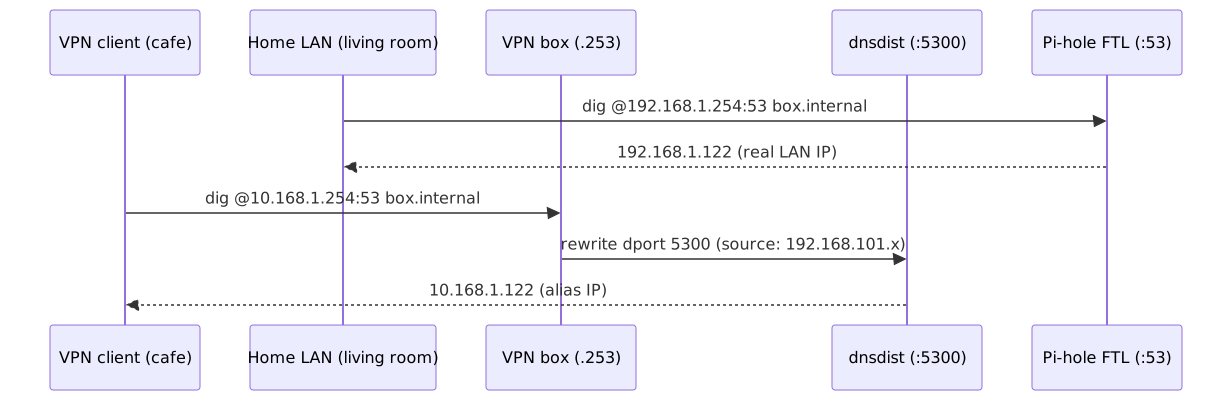
"Nobody" types raw IP addresses into a browser or terminal; you type hostnames like `home.internal`. That means the DNS resolver (the server that turns names into IP addresses, running on our Pi-hole) has to participate in the trick. If you ask for `home.internal` while sitting in the living room, it should answer `192.168.1.122`. But if you ask over the WireGuard tunnel from a cafe, it must return the alias address `10.168.1.122`. If it answered with `192.168.1.122`, the laptop would look at the cafe's Wi-Fi, decide `.122` was local, and never send the packet into the tunnel at all.
The design was clean on paper: a 1:1 alias subnet across the whole home, and split-horizon DNS answering with alias addresses over the VPN. Then we sat down at a cafe to test it.
## The Chain That Nobody Jumped
Sitting on the cafe Wi-Fi with the WireGuard tunnel active, we tried pinging a test home server at the alias IP `10.168.1.122`. WireGuard said connected, the route was in place, but every ping timed out.
On the VPN box, `nft list` showed our new translation rule sitting inside `chain dstnat_vpn`. But that chain's packet counter stayed at zero: the rule was in the kernel, and not a single packet had ever touched it.
OpenWrt [fw4](https://openwrt.org/docs/guide-user/firewall/firewall_configuration) allows custom firewall extensions via drop-in configuration files: any `.nft` file placed in `/etc/nftables.d/` is automatically included at the table root. We had created a drop-in file defining our subnet translation inside `chain dstnat_vpn`. Earlier, we had tested individual hosts using OpenWrt's standard UCI `redirect` sections. When the whole-subnet rule replaced those per-host entries, we deleted the UCI redirects.
Here is the catch: fw4 only generates a jump from base `dstnat` into `dstnat_` when at least one standard UCI `redirect` exists for that zone. Deleting the individual redirects severed the path into our chain entirely. It sat in kernel memory with no caller. Defining base `chain dstnat` directly inside the drop-in file failed too, because fw4 includes drop-in snippets before it defines its own base chains.
The hook that actually works is a UCI `chain-append` pointing at the drop-in file, attaching it to `dstnat` itself:
```ini
config include 'alias_netmap'
option type 'nftables'
option path '/etc/nftables.d/netmap.include'
option position 'chain-append'
option chain 'dstnat'
```
With `chain-append`, fw4 attaches our rules directly to `dstnat` after creating the base chains. A quick `fw4 reload`, another ping from the cafe, and the packet counter finally moved. Traffic was hitting the chain.
Except the ping was still failing.
## The Pool That Looked Like a Map
The first line we appended looked like whole-subnet translation:
```text
iifname "wg0" ip daddr 10.168.1.0/24 dnat ip to 192.168.1.0/24
```
To human eyes, writing `10.168.1.0/24 dnat to 192.168.1.0/24` reads as a 1:1 prefix mapping that preserves host numbers, and running `nft list ruleset` even echoes back that exact line.
It is a trap. [nftables treats a subnet on the right-hand side of `dnat to` as a pool](https://wiki.nftables.org/wiki-nftables/index.php/Performing_Network_Address_Translation_%28NAT%29#NAT_pooling). If you inspect what the compiler actually generated with `nft --debug=netlink`, the kernel bytecode gives the game away:
```text
[ nat dnat ip addr_min 192.168.1.0 addr_max 192.168.1.255 ]
```
The kernel was not preserving host numbers. It treated `192.168.1.0/24` as a pool of 256 random addresses, rewriting incoming packets to whatever IP it felt like across the home network.
A true 1:1 prefix translation requires the prefix map syntax, which [current nftables spells as a destination map](https://serverfault.com/questions/1156428/configuring-destination-nat-nftables-entire-subnet):
```text
iifname "wg0" ip daddr 10.168.1.0/24 counter dnat ip prefix to ip daddr map { 10.168.1.0/24 : 192.168.1.0/24 }
```
That compiled cleanly on OpenWrt 24.10.8 (kernel `6.6.144`). `nft --debug=netlink` confirmed a real prefix translation rather than `addr_min` / `addr_max`.
Now `ping 10.168.1.122` answered instantly. Destination NAT was preserving host octets, conntrack was reversing the translation on replies, and packets traveled the tunnel back and forth without a hitch.
Raw IP addresses were working. But as soon as we opened a browser, the cafe took over again.
## House Numbers on a Foreign Street
The IP map was working, but typing `http://box.internal` in a browser still landed on the cafe's router login page.
The WireGuard profile specifies a DNS server using the [`DNS =` line](https://man.archlinux.org/man/wg-quick.8.en#CONFIGURATION). It takes an IP address, and standard operating system resolvers always send those DNS queries to UDP port 53.
On the home LAN, [Pi-hole's FTL](https://docs.pi-hole.net/ftldns/) listens on `192.168.1.254:53`. When asked for `box.internal`, it answers with the real LAN IP: `192.168.1.122`. When you are at home, that is correct. But when you are at a cafe whose Wi-Fi also uses `192.168.1.0/24`, that answer is poison: your laptop sees `192.168.1.122`, decides it is local to the cafe, and never sends the connection into the tunnel.
We needed DNS queries arriving over the VPN to return `10.168.1.122` instead.
Modern browsers can use [DNS-over-HTTPS](https://en.wikipedia.org/wiki/DNS_over_HTTPS) (DoH), sending queries inside encrypted HTTPS requests rather than plain port 53. We already had [dnsdist](https://dnsdist.org/) running on the Pi-hole host to handle DoH, configured to return DNS A records containing the `10.168.1.x` alias addresses for VPN clients (`192.168.101.0/24`). Over DoH, `https://10.168.1.254/dns-query` answered with `10.168.1.122`.
The problem is that the WireGuard client profile has no field for DoH. It only configures the operating system's standard resolver (`DNS = 10.168.1.254`), which fires standard queries over port 53. And port 53 on the Pi-hole belonged to FTL, which was still answering `192.168.1.122`.
The obvious architectural temptation is to put dnsdist on port 53 in front of Pi-hole, letting it handle every DNS query for the entire house. We rejected that. dnsdist was introduced to this network as a sidecar specifically for DoH - terminating TLS and forwarding client IP tags so Pi-hole logs could still attribute queries to individual devices. Pi-hole FTL handles the household's primary DNS natively. Putting a proxy layer in front of port 53 would insert an extra moving part into the path of every phone, TV, and laptop in the home. A misconfiguration or crash in dnsdist would take down the entire household's internet. Roaming VPN tweaks should not jeopardize the living room.
Instead, FTL kept port 53 for the house. dnsdist was given an additional plain listen on `192.168.1.254:5300`. Then the VPN box rewrites any port 53 queries coming across the tunnel to that side listen, placed *before* the general `/24` prefix map:
The rewrite rules on the VPN box:
```text
iifname "wg0" ip daddr 10.168.1.254 udp dport 53 dnat ip to 192.168.1.254:5300
iifname "wg0" ip daddr 10.168.1.254 tcp dport 53 dnat ip to 192.168.1.254:5300
iifname "wg0" ip daddr 10.168.1.0/24 counter dnat ip prefix to ip daddr map { 10.168.1.0/24 : 192.168.1.0/24 }
```
The dnsdist spoof rule is source-gated to tunnel addresses (`192.168.101.0/24`). A query from the home LAN to port 5300 still receives `192.168.1.122`; only VPN clients get the `10.168.1.x` alias.
Tested on a hotspot sharing `192.168.1.0/24`, both `ping 10.168.1.122` and standard `dig @10.168.1.254 box.internal` returned the alias. The house answered as itself from a street that had already claimed its numbers.
We had completely solved `192.168.1.0/24` collisions. Then we walked into a cafe that used a completely different private subnet.
## Two /1s and a Cafe /8
A second cafe numbered our laptop out of `10.0.0.0/8`. The WireGuard handshake connected. Public traffic like `1.1.1.1` through the tunnel worked fine. But `10.168.1.254` timed out.
A quick trace showed that `ping` packets were leaving the laptop's Wi-Fi interface instead of entering the tunnel. The cafe router's local filter saw packets addressed to `10.168.1.0/24` on its local Wi-Fi and dropped them as foreign private traffic. The packets never entered the tunnel interface (`utun`).
Why? On macOS, `AllowedIPs = 0.0.0.0/0` does not install a single catch-all default route. To avoid tearing down the physical gateway route needed for the encrypted UDP transport, WireGuard installs two `/1` routes instead: `0.0.0.0/1` and `128.0.0.0/1`.
Under longest prefix match, the cafe's on-link `10.0.0.0/8` route is more specific than WireGuard's `0.0.0.0/1` route. Any packet sent to a `10.x.x.x` address, including our `10.168.1.0/24` alias, was claimed by the cafe's local Wi-Fi interface. The tunnel had won the default route, but lost the alias.
The fix was to explicitly list the alias subnet in the client's `AllowedIPs`:
```ini
AllowedIPs = 0.0.0.0/0, ::/0, 10.168.1.0/24
```
Because `/24` is more specific than `/8`, the kernel routes `10.168.1.x` into `utun`. Checking `route -n get 10.168.1.254` confirmed the tunnel interface owned it. On the same Wi-Fi, alias ping, DoH, and port 53 DNS immediately passed.
`::/0` is still leak prevention for the client's other stacks, same as the first post. We have not put IPv6 on the home LAN.
We keep the full tunnel (`0.0.0.0/0, ::/0`) with the alias subnet appended. A full tunnel guarantees fail-closed security: if the VPN handshake drops, network traffic won't silently leak onto the cafe's unencrypted Wi-Fi. (The official WireGuard app on macOS will cheerfully display a green "Connected" status even when no handshake reply has arrived; running `tcpdump` on the Wi-Fi interface is the only reliable way to confirm packets are returning.)
With these fixes in place, the laptop could connect from `192.168.1.0/24` cafes and from `10.0.0.0/8` cafes. That held until we walked into a third cafe, and nothing connected at all.
## The Third Cafe Will Not Dial the House
A third cafe presented a failure mode that had nothing to do with IP collisions: it refused to talk to the house at all.
TCP port 443 to our home WAN IP timed out, even though ordinary HTTPS browsing to public websites worked without issue. WireGuard UDP handshakes were dropped both on our standard listen port and on UDP 443. The filter was destination-based rather than port-based: the cafe dropped all traffic to our home's public IP, regardless of protocol or port.
A second listen port on the same public IP cannot route around a filter aimed at that IP. Bypassing that kind of restriction requires an intermediary whose IP is not our home WAN (such as a VPS relay or cloud hub). We have not built that hop. Until we do, those cafes are cellular hotspot weather. If the handshake fails, the cafe simply does not get our traffic.
## The Recipe: Adding the Alias Subnet to the Lodge
If you already followed the setup in [The Gate Lodge](/2026/08/22/the-gate-lodge.html#release-image-to-a-tunnel), you do not need to rebuild your VPN box from scratch. The snippets below are the exact configuration delta needed to add the `10.168.1.0/24` alias subnet and split-horizon DNS.
Adjust the IP addresses if `10.168.1.0/24` is already in use on your network. The snippets assume WireGuard listen port `51820` as configured in the first post.
### On the VPN box
`/etc/nftables.d/netmap.include`. Use a name that is not `*.nft`, or fw4 will also include it at the table root.
```text
iifname "wg0" ip daddr 10.168.1.254 udp dport 53 dnat ip to 192.168.1.254:5300
iifname "wg0" ip daddr 10.168.1.254 tcp dport 53 dnat ip to 192.168.1.254:5300
iifname "wg0" ip daddr 10.168.1.0/24 counter dnat ip prefix to ip daddr map { 10.168.1.0/24 : 192.168.1.0/24 }
```
Then the UCI include:
```ini
config include 'alias_netmap'
option type 'nftables'
option path '/etc/nftables.d/netmap.include'
option position 'chain-append'
option chain 'dstnat'
```
Then `fw4 reload`. Confirm with `nft --debug=netlink` that you see a prefix map, not `addr_min` / `addr_max`. `fw4 print` should still have no srcnat of `192.168.101.0/24`.
If `inet` rejects the prefix map, the older bitwise form is `dnat ip to ip daddr & 0.0.0.255 | 192.168.1.0`.
### On the Pi-hole
Keep FTL on `192.168.1.254:53`. Add a dnsdist plain listen and leave `newServer` pointed at FTL:
```lua
addLocal('192.168.1.254:5300')
```
Overlay spoof, source-gated. Load your real LAN names however you like; this is the shape:[lua](#postscript-lua)
```lua
local wgNet = newNMG()
wgNet:addMask("192.168.101.0/24")
addAction(
AndRule({
NetmaskGroupRule(wgNet),
QNameRule("box.internal."),
QTypeRule(DNSQType.A)
}),
SpoofAction("10.168.1.122")
)
```
`systemctl restart dnsdist`. dnsdist has no useful reload. `ss -tulnp` is the bind inventory; `ss -ulnp` will hide a TCP-only DoH listen and lie to you.
Overlay allow and WAN 53 closed stay as in the first post.
### On the client
DNS and `AllowedIPs` are the delta. The rest matches the first paste.
```ini
[Interface]
PrivateKey = CLIENT_PRIVATE_KEY
Address = 192.168.101.2/32
DNS = 10.168.1.254
[Peer]
PublicKey = SERVER_PUBLIC_KEY
Endpoint = vpn.example.com:51820
AllowedIPs = 0.0.0.0/0, ::/0, 10.168.1.0/24
PersistentKeepalive = 25
```
From a colliding `/24`, `dig @10.168.1.254 box.internal` must return `10.168.1.122`. A house A on port 53 is a fail. DoH to the same alias should agree. `ping 192.168.1.254` may still hit the cafe; that is the point of the alias.
---
## Postscript: Ingesting Pi-hole Records at Startup {#postscript-lua}
Hardcoding individual LAN hosts into `dnsdist.conf` creates a fragile second source of truth: whenever you add a static entry or new device in Pi-hole's web interface, you would have to remember to duplicate the rule in dnsdist and restart it.
Because dnsdist configuration files are executable Lua, the daemon can read Pi-hole's records directly into memory when it boots. When Pi-hole saves a local record from the dashboard, it writes a standard hosts-style entry to `/etc/pihole/custom.list`. Parsing that file alongside `/etc/hosts` registers an alias spoof for every `192.168.1.x` address automatically:
```lua
local wgNet = newNMG()
wgNet:addMask("192.168.101.0/24")
local function load_vpn_aliases(filepath)
pcall(function()
local f = io.open(filepath, "r")
if not f then return end
for line in f:lines() do
line = line:match("^%s*(.-)%s*$")
if line ~= "" and not line:match("^#") then
local ip, domain = line:match("^(%d+%.%d+%.%d+%.%d+)%s+(%S+)")
if ip and domain then
local last_octet = ip:match("^192%.168%.1%.(%d+)$")
if last_octet then
local alias_ip = "10.168.1." .. last_octet
local qname = domain:gsub("%.$", "") .. "."
addAction(
AndRule({
NetmaskGroupRule(wgNet),
QNameRule(qname),
QTypeRule(DNSQType.A)
}),
SpoofAction(alias_ip)
)
end
end
end
end
f:close()
end)
end
load_vpn_aliases("/etc/pihole/custom.list")
load_vpn_aliases("/etc/hosts")
```
The parser is defensive: lines from other subnets are ignored, missing files fail silently through `pcall`, and trailing dots are normalized. When a new home server joins the house, adding it to Pi-hole and restarting dnsdist is all it takes to make it reachable over the VPN.